 Japan eSIM | DJB
 South Korea eSIM | DJB
 Thailand eSIM | DJB
 Americas eSIM | DJB
 Americas eSIM | DJB
 Philippines eSIM | DJB



Which app should you use for maps in Korea? Open up Google Maps for Seoul, and you may notice it feels a bit thin on information — that is because locals mainly rely on Korean map apps instead. These four apps give you much richer coverage of Seoul and Busan.

Why don't Koreans use Google Maps?
It comes down to Korea's national security policy. Whether navigating at home or travelling abroad, most of us are used to checking reviews and finding destinations through Google Maps. But under Korean law, internet companies are not permitted to store mapping data on servers located outside Korea, and certain sensitive locations must be edited or blurred. Because of this, Google Maps ends up quite bare-bones in Korea — turn-by-turn navigation simply does not work, so it is nowhere near as useful there as it is elsewhere.
4 recommended Korean map apps
Because of this, the maps most Koreans actually use are built by domestic Korean companies rather than Google Maps. Let's take a look at which map apps are most commonly used in Korea:
| Map app | Pros | Cons |
| NAVER Map | - Supports LINE and Facebook login - Available in Simplified Chinese and English - Highly accurate with plenty of detail - Connects to public transport routing - Real-world street-view imagery - Can search an address by entering a store's phone number - Interface feels similar to Google Maps - Saved places can be renamed (handy for planning ahead) | - The Simplified Chinese interface may still mix in Korean |
| Kakao Map | - Available in English - Built-in reminder feature - Favourites can be renamed (handy for planning ahead) - Works with Kakao T (taxi) - Can share your current location | - Requires some foreign-language ability - The English interface may still mix in Korean - Real-time subway info has no English translation |
| Hanso Map (Konest Map) | - Can log in to save spots - Can search an address by entering a store's phone number - Clear subway maps with elevator information - Rich Chinese-language data - Real-time information available | - App can feel sluggish, with slower loading - Simplified/Traditional Chinese conversion is imperfect - No street view - Cannot pin a custom location on the map |
| Hanyou Map | - Traditional Chinese available - Street view available | - No login or save-favourites feature - Contains ads - Cannot pin a custom location on the map - No real-time information |
Having gone through all four, here is a quick summary of who each app suits best:
- If you have some Korean and English ability: Kakao Map
- If you can read Simplified Chinese and are used to how Google Maps works: NAVER Map (the most widely used!)
- If you need a fully Chinese-language interface: Hanso Map or Hanyou Map
Getting around Korea independently with the help of these apps
Here is what you will need:
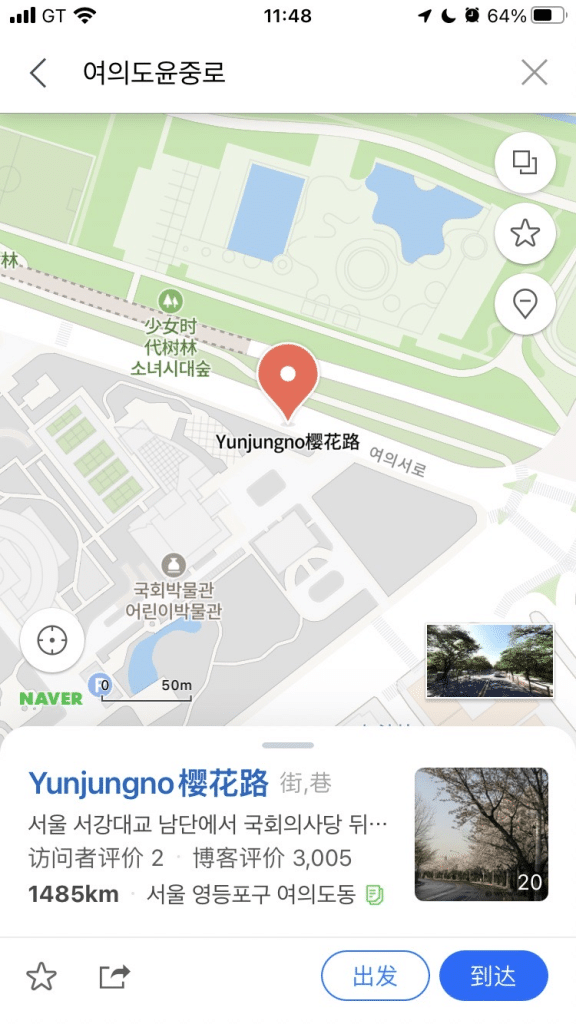
1. A map app ➤ using NAVER Map as the example here
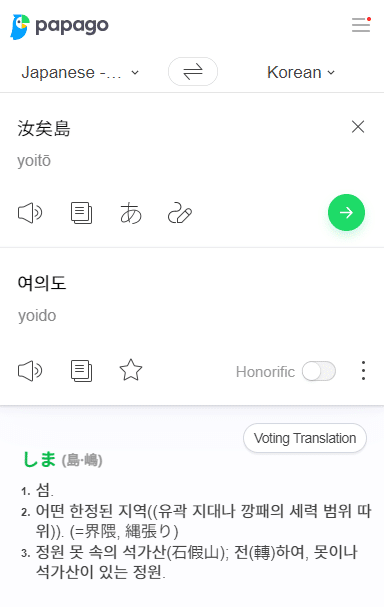
2. A translation app ➤ NAVER Papago
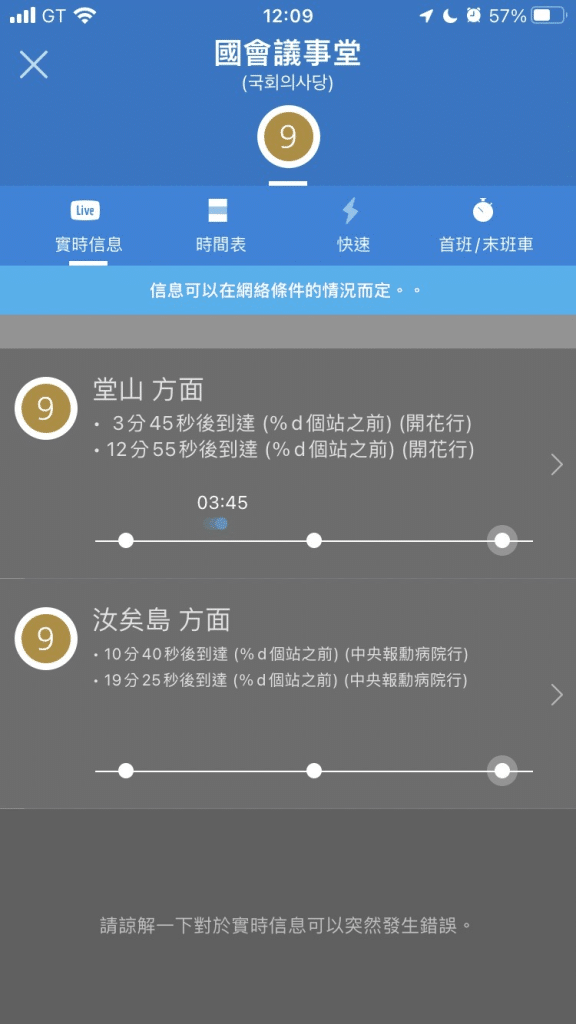
3. A transport app ➤ Subway Korea
4. A data SIM ➤ DJB's Korea data SIM
Let's say we are heading to Yeouido in Seoul next spring for the cherry blossoms — here is how it works:
Step 1: Open NAVER Map and check that it has picked up Seoul (confirm your location)
Step 2: Use Papago to translate "Yeouido" into Korean, then enter it into NAVER Map
Step 3: If it is a longer trip, use Subway Korea to check transport details
Whichever app you choose, whether you are looking up a Busan map or maps for anywhere else in Korea, you will need a solid connection to search and navigate. Choose the DJB Korea data SIM, powered by Korea's SK network. Data plans come in all shapes, from genuinely unlimited no-throttle options to budget-friendly capped or throttled plans. Pair it with the map apps covered here and explore Korea freely!
Or go with the DJB Korea eSIM, which automatically switches between multiple local carriers for the best connection, keeping you online at speed without interruption. No installation needed with this virtual SIM — DJB is with you wherever you travel~


Comments are closed for this article.
Comments (0)